macOSmacOS 13+ · 230 MB
Verified by Apple, opens right away
Not sure? Apple menu → About This Mac → check “Chip”.
Coding adventures and Coding Studio for ages 4–6 and 7–9. Arrange blocks, move Ciko, and create stories, dances, and drawings with a grown-up.
›Children build code like this from picture blocks.Start with Direction Garden, no subscription needed. Other adventure groups are available with Premium.
Build commands. Run them. Find your way.
Turn in place. Move one tile forward. Order matters!
Children choose characters, arrange picture blocks, and see the result on stage. Stories, dances, and drawings become programs they can try and change.
Try Coding StudioTry it in your browser with a grown-up. No robot needed.A sequence makes the character move, then say hello.
Movement, sequences, loops, and events. Change a block and see what happens.
Use Ciko, their own avatar, or draw a new character.
Add sounds or record a short voice clip with a grown-up’s permission.
Arrange scenes and backdrops, play the story, and save it on the device.
From a first little arrow to a story of their own. Every discovery begins with play.
Build a sequence, spot a pattern, and help Ciko find the way.
forward(1) → turn("right") → forward(2)Choose your character, earn coins by learning, and mix 100+ outfits, hats, and accessories.
character.wear("hat") → coins + 5Have mTiny? Try bonus practice levels at the end of a world. Learn fully without a robot, too.
robot.forward() → robot.turn("left")Two games that show their code live: children watch events, conditions and loops at work, then change them.
Visitors arrive for food and drinks. Children arrange plants, write serving rules and watch guests enjoy their picnic.
Children feed, rest and play with their pet, then write its rules: When → If → Do. The pet follows the child’s code, and every mission is tested by its behaviour.
Ciko has a destination. You have an idea to help.
Tap blocks, run the steps, and see what happens.
Not there yet? Change a step. Every attempt counts.
It’s not a race to finish first. It’s a space to experiment, take a break, and discover something together.
An example of a reflection after play
KodingKids’ Makeblock picks for ages 4–6 and 7–9. Match the robot to your child’s readiness and explore together.

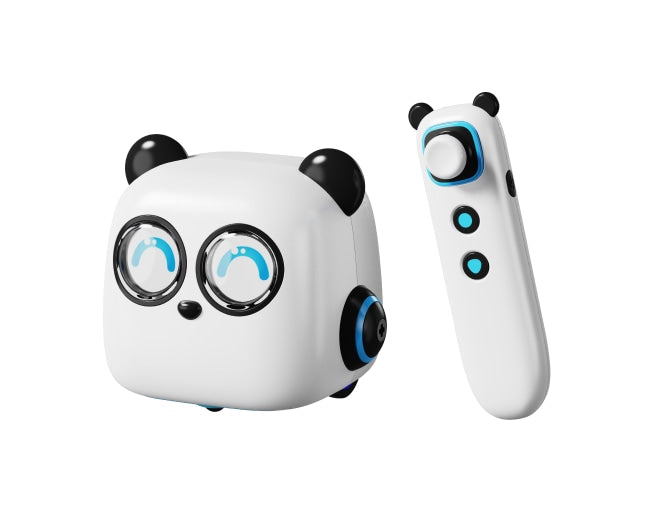
A robot with a tap pen, command cards, and maps. Children sequence movements without a screen, with a grown-up.
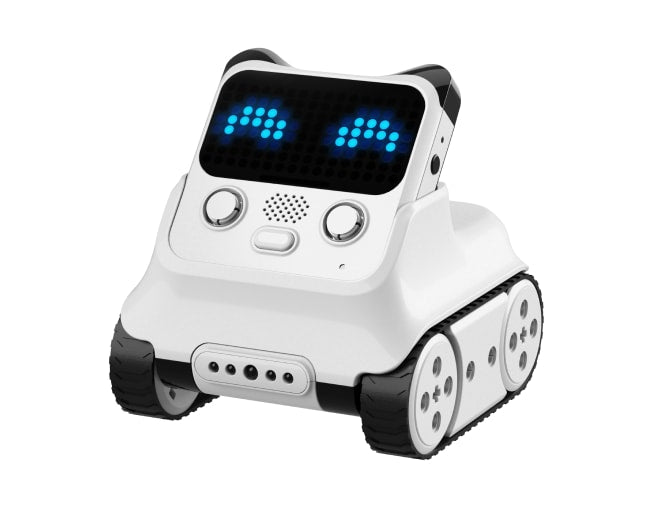
A robot with an LED display and sensors, programmed in mBlock. Great for events, expressions, and responses to colours or lines.
Web activities work without a kit. Physical practice uses Makeblock devices and software; KodingKids does not directly control the robots yet. Photos and logo: Makeblock.
Direction Garden is available without a subscription. Later adventure groups require Premium. Challenges unlock step by step as your child progresses.
Not necessarily. Early activities use icons, arrows, and visual examples. A grown-up can read instructions aloud, or use the device’s voice reader when available.
Not for on-screen learning. The simulator and coding activities work without a robot. Physical mTiny practice requires your family’s Discovery Kit and a grown-up.
Open KodingKids in a computer, tablet, or phone browser. Landscape gives the play area and controls more room. The mobile app is in development; public access is currently through the website.
Trial mode saves progress on the current device. After signing in with a parent account, check the save status in the Parents space before continuing on another device. Keep progress that has not synced on the original device. You can also export data from the Parents space.